



- Home
- Online casinos
- 96.com Casino App Download
 United States is accepted
English website
 New casino
- United States is acceptedNew casino
- United States is accepted


96.com Casino App Download
Getting 96.com Casino onto your phone looks different depending on which device you're holding. Android users get an actual APK — a standalone installation file pulled straight from the official site footer. iPhone and iPad owners won't find anything in the App Store; their route is the browser, with a home screen shortcut as the closest thing to an app icon.
This guide walks through both paths: where to find the APK, how to clear Android's installation prompts, why iOS users don't miss much by going browser-only, and what the mobile interface actually delivers once you're in.
Does 96.com have a mobile app?
| Question | Answer |
|---|---|
| Native Android app? | ✅ Yes — APK only |
| APK available? | ✅ Yes — footer of the official website |
| Google Play app? | ❌ No |
| Native iOS app? | ❌ No |
| App Store listing? | ❌ Not available |
| Mobile browser version? | ✅ Yes — fully functional |
| PWA / home-screen shortcut? | ✅ Yes — iOS and Android both support it |
| Registration required before install? | ❌ No — APK download does not require an account |
| Same games as desktop? | ✅ Yes |
| Mobile bonuses available? | М Yes — identical to desktop offers |
The Android APK is a genuine installation file, not a PWA wrapper or a browser bookmark dressed up as an app. It downloads from the footer section of 96.com and installs like any other third-party Android application — manually, outside of the Play Store.
iOS support stops at the browser. There is no App Store listing, no TestFlight build, and no workaround that produces a native iPhone app.For iOS players, the Safari version of the site handles the full feature set, and the home screen shortcut cuts out the extra tap of opening a browser first.
How to download and install 96.com on Android
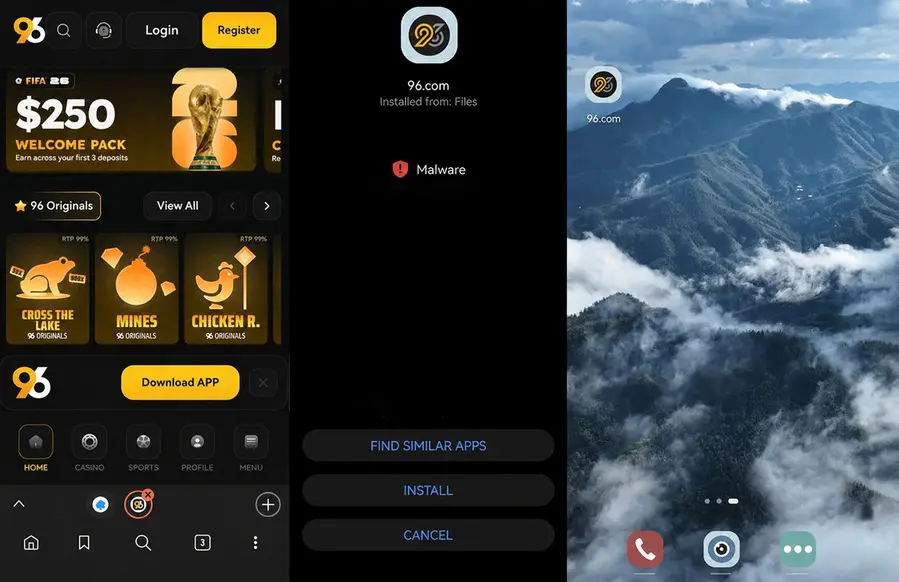
The 96.com Android app is not available on Google Play. To install it, Android users need to download the APK file directly from the official 96.com website.
You can find the APK download link in the footer of the 96.com homepage. Since the app is installed outside Google Play, Android may ask you to allow installation from your browser before the APK can be installed.
- Open 96.com in Chrome or your default Android browser.
- Scroll to the bottom of the homepage and tap the "APK download link" in the footer menu.
- Confirm the download if your browser shows a warning about files from external sources.
- Once the download is complete, open the APK file from the notification bar or your Downloads folder.
- If Android blocks the installation, go to Settings → Apps → Special app access → Install unknown apps.
- Find your browser in the list and allow installation from that source.
- Return to the downloaded APK file and tap “Install.”
- Once installed, open the 96.com app from your home screen and log in or create an account.
The Android warning about installing unknown apps is a standard security message for APK files installed outside Google Play. It does not automatically mean the file is unsafe, but you should only continue if the APK was downloaded from the official 96.com website.
For extra security, you can turn off the “Install unknown apps” permission for your browser after the installation is complete.
Safety note: download the APK only from 96.com. Third-party sites, mirror links, and unofficial repositories may host modified or outdated files, and their integrity cannot be verified.
Update note: Because the app is not installed through Google Play, updates may need to be installed manually.
How to play 96.com on iPhone and iPad
There is currently no dedicated 96.com app in the Apple App Store, so iOS users cannot install the app on their devices.
The easiest way to use 96.com on iPhone or iPad is through Safari or another mobile browser. Open 96.com, sign in or create an account, and the site will automatically load in its mobile layout.
To play 96.com on iPhone or iPad:
- Open Safari on your iPhone or iPad.
- Go to 96.com.
- Wait for the mobile version of the site to load.
- Sign in or create a new account.
- Open the casino lobby, cashier, bonuses, or any other section directly from the mobile menu.
For faster access, you can also add 96.com to your iOS home screen:
- Open 96.com in Safari.
- Tap the Share button at the bottom of the screen.
- Scroll through the options and select “Add to Home Screen”.
- Rename the shortcut if needed and tap “Add”.
The 96.com icon will then appear on your iPhone or iPad home screen. Tapping it opens the mobile website directly, so you do not need to type the address each time.
This shortcut is not a native iOS app. It does not add push notifications, offline access, or App Store updates. It simply gives you quicker access to the browser version of 96.com.
96.com mobile app overview
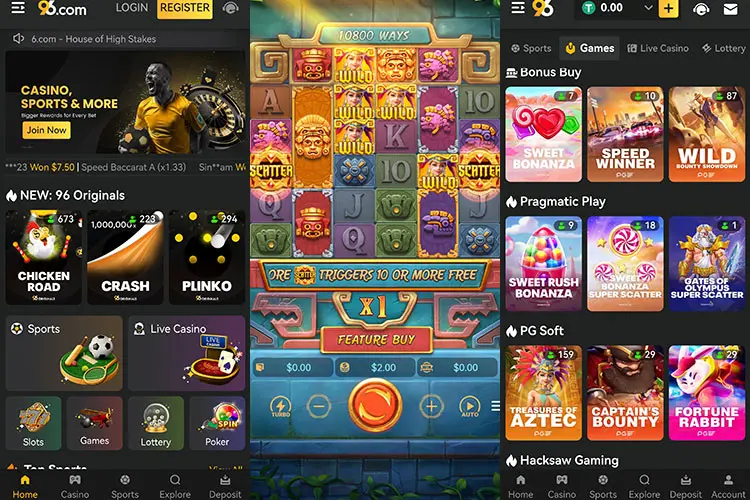
The 96.com mobile interface gives access to the main casino features from both the Android APK and the browser version. The site is adapted for vertical scrolling, touch controls, and standard mobile screen sizes, so most sections can be used without switching to desktop.
During our mobile review, 96.com loaded without major layout issues on standard screen sizes. The 96 Originals section, including games such as Crash and Coinflip, opened quickly on a stable connection and ran without visible frame drops during testing. Actual performance may vary depending on your device or internet connection.
On mobile, you can:
- Register or log in directly from your phone.
- Browse Slots, Live Casino, Instant Games, Lottery, Sports, and Promotions.
- Use the search bar to find games across the casino library.
- Filter games by provider through the Vendor List section.
- Play 96 Originals such as Crash, Coinflip, HiLo, Dice, and Plinko.
- Open live casino tables directly from the mobile interface.
- Access the Cashier for deposits and withdrawals.
- Use supported payment options, which may include crypto and local methods depending on your region.
- Contact support through live chat.
- Try compatible games in demo mode before playing for real money.
The mobile layout is generally easy to navigate. The main sections are reachable from the menu, and the interface does not rely on horizontal scrolling. Some live dealer games may switch to landscape mode automatically, depending on the provider, so rotating your device may be required for the best view.
However, there are a few limitations. For example, live sports streaming is not available in the mobile interface, although in-play data and scoreboards may be shown. Push notifications are also not available through the browser version or iOS home-screen shortcut.
FAQ
- United States is acceptedNew casino
- United States is acceptedNew casino
- United States is accepted