



- Home
- Online casinos
- SpinBetter App Download
 United States is accepted
English website
 New casino
- United States is acceptedNew casino
- United States is accepted


SpinBetter App Download
SpinBetter Casino offers a dedicated mobile app for both Android and iOS (not browser shortcuts or PWA wrappers). Android users download a free APK directly from spinbetter.com — the app is not on Google Play due to Google's restrictions on gambling content.
iPhone and iPad users install the app via TestFlight, Apple's official beta testing platform. A fully functional mobile browser version is also available on both platforms without any installation.
| Question | Answer |
|---|---|
| Native Android app? | ✅ Yes — APK |
| APK available? | ✅ Yes — from spinbetter.com only, not Google Play |
| Google Play app? | ❌ No |
| Native iOS app? | ✅ Yes — via TestFlight |
| App Store listing? | Via TestFlight (Apple's beta platform) |
| Mobile browser version? | ✅ Yes — fully functional |
| PWA / home-screen shortcut? | ✅ Yes — available as alternative on iOS |
| Registration required before install? | ❌ No — install first, register later |
| Same games as desktop? | ✅ Yes — Sports, Casino, Live Casino, Esports, TV Games, Virtual Sports, Bingo |
| Mobile bonuses available? | ✅ Yes — including an app-exclusive free bet |
How to download SpinBetter on Android
The SpinBetter Android app is not available on Google Play. To install it, Android users need to download the APK file directly from the official SpinBetter website.
To download and install:
- Follow the link in Chrome or your default Android browser
- Tap the menu icon and select “Mobile App,” or use the download banner if it appears on the homepage.
- Tap the Android / APK download button.
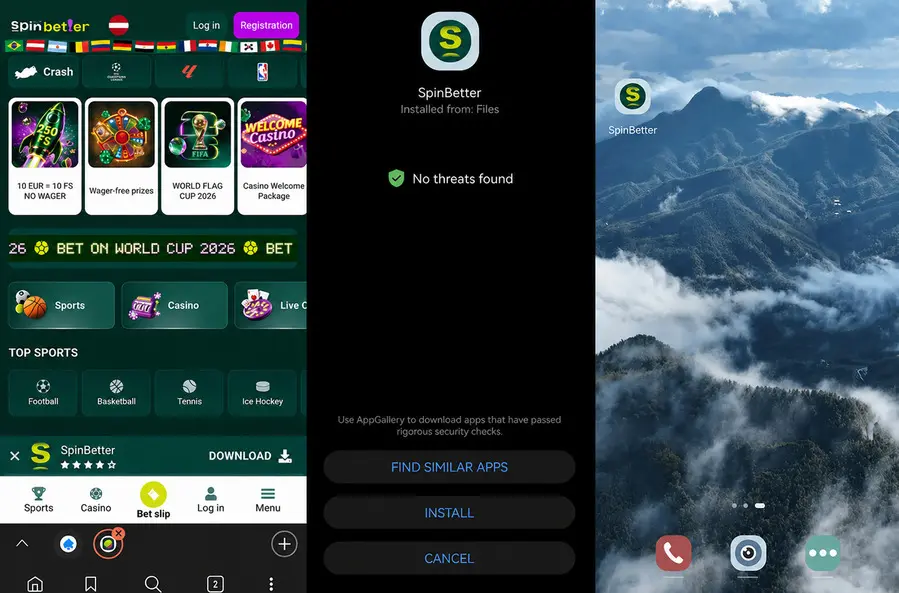
- Confirm the download when your browser asks for permission.
- If Android blocks the installation, go to Settings → Security or Privacy and allow “Install unknown apps” for your browser.
- Return to the downloaded APK file (around 84 MB).
- Open the file from your Downloads folder or notification bar. Tap “Install.”
- Once installed, open the SpinBetter app and log in or create an account.
The “unknown apps” warning is a standard Android security message for apps installed outside Google Play. It does not automatically mean the file is unsafe, but you should only continue if the APK was downloaded from the official SpinBetter website.
For extra security, you can turn off the “Install unknown apps” permission for your browser after the installation is complete.
Important: avoid third-party APK sites, mirror links, or unofficial download pages. The safest source for the SpinBetter Android app is the official SpinBetter website.
How to play SpinBetter on iPhone and iPad
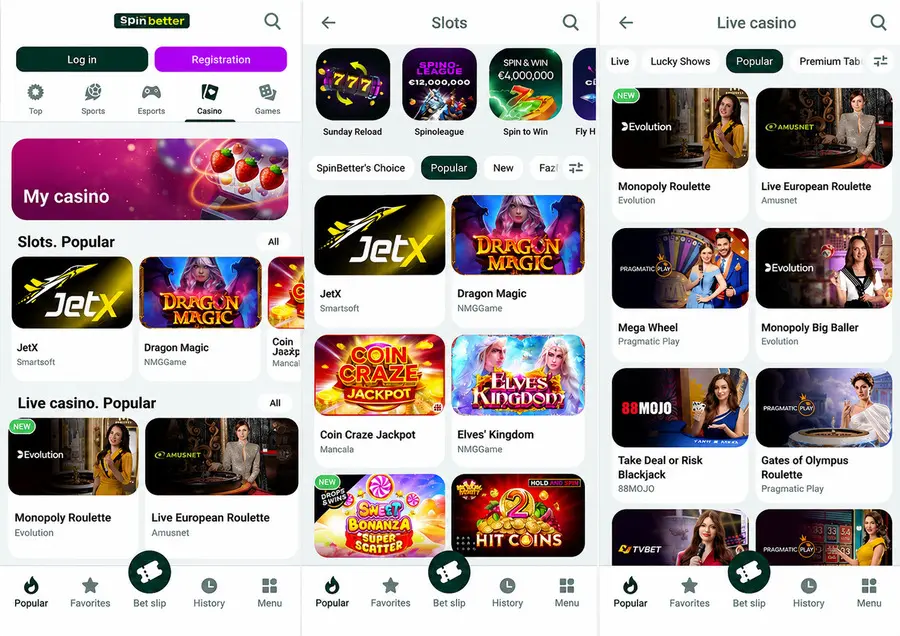
The SpinBetter iOS app is available through TestFlight, Apple’s official app testing platform. It is not listed in the standard App Store catalogue, so iPhone and iPad users need to install TestFlight first and then open the SpinBetter invitation link from the official SpinBetter website.
The app works on iPhone and iPad devices running iOS 16 or later.
To install SpinBetter on iPhone or iPad:
- Open the App Store and download the free TestFlight app.
- Go to spinbetter.com on your iPhone or iPad.
- Open the “Mobile App” section on the SpinBetter website.
- Tap the iOS / TestFlight invitation link.
- When the TestFlight page opens, tap “Accept.” Tap “Install” to download the SpinBetter app through TestFlight.
- Allow TestFlight notifications if you want to receive update alerts.
- Tap “Start Testing” to open the app.
- Log in with your existing SpinBetter account or register directly inside the app.
Once installed, the SpinBetter app appears on your iPhone or iPad home screen like a regular app. It can also support standard iOS features such as push notifications and biometric login, depending on your device settings and the app version.
One thing to keep in mind is that TestFlight builds expire after a set period. If the current SpinBetter build expires or a new version is released, TestFlight may ask you to update or reinstall the app through the same invitation link.
Alternative: Safari home-screen shortcut
If TestFlight is not available in your region, or if you prefer not to install the app, you can use the mobile browser version instead. Open spinbetter.com in Safari, tap the Share button, select “Add to Home Screen,” and confirm.
This creates a shortcut to the SpinBetter mobile site on your iPhone or iPad. It is not a native iOS app, does not provide the same app-specific features, and may not qualify for app-exclusive offers such as free bet promotions.
Are there mobile bonuses at SpinBetter?
SpinBetter has one app-specific promotion that is not available on the mobile website: a freebet awarded after placing ten consecutive sports bets using the mobile app. The freebet amount is based on average stake across those ten bets. This bonus is only tracked when bets are placed through the installed app — browser bets do not count toward the streak.
All other bonuses are accessible on both the app and the mobile browser version. All bonus terms are readable within the mobile interface before opting in.
FAQ
- United States is acceptedNew casino
- United States is acceptedNew casino
- United States is accepted